Printify
3.531.00Reviews
Analysis ByAppCompare
Running a print-on-demand shop from a phone sounds convenient until the work becomes a constant shuffle between product ideas, mockups, orders, and customer messages. Printify, from Printify, Inc., is built for that mobile-first routine. I tested it as a business app rather than treating it like a simple shopping tool, and my impression is that it works best as a control panel for an existing or developing store, not as a complete replacement for every desktop task.
The app is free and aimed at everyone from curious beginners to sellers who already have designs ready to publish. Its business focus is clear: you use it to organize a print-on-demand operation while away from a computer. That makes it especially useful for checking activity during a commute, reviewing a product idea before posting it, or handling a small operational task between appointments. It is less convincing for someone who wants a full creative studio, detailed financial analysis, or a large catalog workflow entirely on a small screen.
How Printify feels in everyday use
The strongest part of the experience is the change in mindset it encourages. Instead of waiting until you are back at a desk, you can treat your store as something you monitor in short sessions. I found that useful for separating quick decisions from deep work: a phone is good for checking what needs attention, while a larger screen remains more comfortable for careful design preparation and broad catalog management.
A realistic example is a seller who notices an idea while traveling. They can open the app, review the direction of an existing product, and decide whether it is worth developing further. Later, when an order arrives, the same mobile access can help them stay aware of the workflow without opening a laptop. That convenience does not eliminate the need for planning, but it reduces the dead time between noticing something and acting on it.
That distinction matters because print-on-demand businesses often involve many small decisions rather than one dramatic task. A design may need a different product, a listing may need a second look, or an order may require attention at an inconvenient time. Printify is most valuable when it keeps those decisions close at hand. It is not simply about producing an item; it is about making the business easier to supervise throughout the day.
The interface also benefits people who are still learning how this business model works. The app gives the idea of a product-based operation a more practical shape than a collection of notes or spreadsheets. You can think in terms of products, listings, and orders instead of trying to remember which stage each idea has reached. For a first-time seller, that structure can make the process feel less abstract.
Still, I would not confuse accessibility with simplicity. A phone-based workflow can make a task available without making it effortless. Product decisions still require attention to artwork, placement, audience, margins, and presentation. Printify helps bring the operation to the phone, but it cannot make weak designs or unclear product choices successful.
Where the mobile format helps most
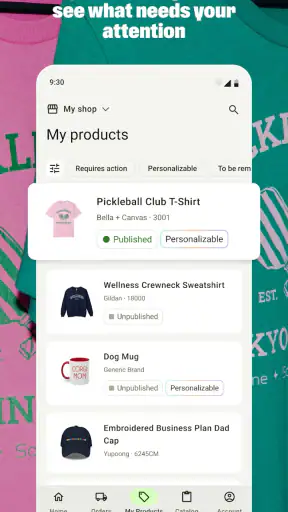
My favorite use case is quick operational checking. If I have only a few minutes, I would rather open one business app than reconstruct the state of a shop from separate notes and browser tabs. This is where the app feels more purposeful than a generic mobile browser session: it is designed around the needs of a print-on-demand seller rather than asking the user to navigate a general website first.
It is also handy for idea capture. A creator who thinks visually may spot a seasonal concept, a phrase, or a niche audience while away from the desk. The app can become the place where that idea moves from “maybe later” into a more concrete product workflow. My advice is to use those short sessions for decisions and review, then reserve larger creative changes for a computer when precision matters.
Another useful habit is checking work at two different moments. I prefer to review a product immediately after preparing it, then return later with fresh eyes before treating it as finished. The phone makes that second look easier because I am not tied to the original editing session. This is a small workflow improvement, but it can catch careless choices that are easy to overlook when working continuously.
The practical advantage is not that a phone replaces a workspace; it is that the business becomes easier to revisit. That makes Printify a better companion for an active seller than for somebody who only wants to browse apparel or order a single custom item.
What the current version tells me
The current version is 26.09.1, and the app was released on September 17, 2025. Those details place this review around a relatively recent product stage, so I see it as a developing mobile business tool rather than a mature desktop suite squeezed into a phone. The important question is not whether it contains every possible store-management function, but whether its present form supports the parts of the workflow people genuinely need while away from a desk.
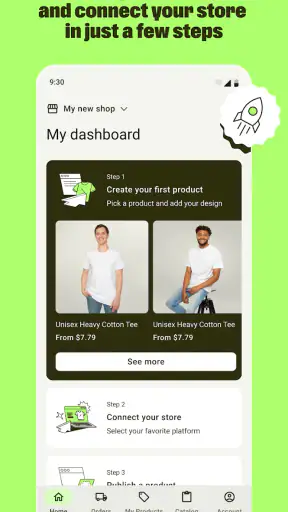
Its store summary presents it as a way to create and run a print-on-demand business from a phone. In practice, I think that promise should be read carefully. “Run” is most believable for oversight, routine actions, and keeping momentum. It is a more ambitious claim if you expect the phone to handle every detailed creative and administrative decision with the same comfort as a full computer setup.
The release timing also makes it sensible to judge the app by its current usefulness rather than by assumptions about where it might go. I would not treat a newer version number as proof that every rough edge has disappeared. Version updates can improve a product, but the right test for a seller is still straightforward: can the app save time in the specific moments when a laptop is inconvenient?
For me, the answer is yes, especially when the task is short and clearly defined. The app feels more convincing when I use it as part of a wider workflow than when I ask it to be the only tool. That is an important nuance for anyone deciding whether to install it.
How existing users may experience the change
People already familiar with Printify will likely appreciate having a more immediate way to stay connected to their operation. Mobile access changes the rhythm of the work. Instead of grouping every action into one long session, you can check progress in smaller intervals and deal with simple decisions before they become a backlog.
That can be particularly helpful for sellers with another job, students managing a side project, or creators who move between locations. A desktop-centered routine often rewards uninterrupted time, while a phone-centered companion supports fragmented time. Neither approach is automatically better, but Printify is useful when your schedule is made of short gaps rather than long blocks.
There is a trade-off, however. Existing users may be tempted to perform too much work from the phone simply because the app is available. I would resist that habit. Small screens encourage quick taps and rapid approval, while product publishing deserves a slower review. A mobile workflow can improve responsiveness, but it can also make it easier to overlook details if speed becomes the goal.
My recommended division is simple. Use the app for monitoring, reviewing, and moving straightforward tasks forward. Use a larger screen when you need to compare several products, inspect artwork closely, or think through a broad catalog strategy. This division gives the app a meaningful role without asking it to solve a problem it was never meant to solve alone.
Who should use it, and who should skip it
I would recommend Printify to a creator who already understands the basic idea of selling printed products and wants more freedom from a desk. It is also a sensible starting point for someone testing whether print-on-demand fits their routine, provided they are willing to learn the business side rather than expecting instant results.
It suits sellers who value mobility, quick checks, and a single place to keep their store activity close. A person who works irregular hours may benefit more than someone who spends the whole day at a computer. The app can also help a small operation feel more manageable because business tasks are easier to revisit in short sessions.
I would be cautious about recommending it as the main tool for a design-heavy professional workflow. If your work depends on exact visual adjustments, complex product comparisons, or extensive catalog organization, a desktop environment will usually feel more natural. The same is true for anyone who dislikes managing business details on a small screen. The app’s convenience is real, but convenience is not the same as depth.
It may also be the wrong choice for someone who wants a traditional inventory business with direct control over manufacturing, storage, and fulfillment. Print-on-demand is attractive partly because it reduces the need to handle physical stock, but that model also means accepting a different level of control. If your priority is personally managing every production step, this app will not change the nature of the model.
Three workflow lessons I would use immediately
First, I would separate “interesting idea” from “ready to publish.” The phone makes it tempting to move quickly from inspiration to listing. Instead, I would use mobile sessions to collect and review ideas, then make a deliberate final check before publishing. This protects the convenience of speed without allowing a rushed decision to define the product.
Second, I would create a habit of reviewing products away from the original design session. A fresh review can expose awkward placement, unclear presentation, or a product choice that seemed better while working on it. The app’s value here is not a hidden button or a dramatic automation; it is the ability to return to the business at a different moment and make a less emotional decision.
Third, I would use the app to protect response time, not to avoid strategy. Quick access is excellent for staying aware of activity, but it should not replace a regular review of which products deserve attention. A seller can become very efficient at checking a store without becoming better at choosing what belongs in it. Printify helps with the first problem; the second still requires judgment.
A fourth lesson is to keep a clear boundary between business monitoring and creative production. When I use a phone for both, I tend to rush the creative side because the device encourages short interactions. Treating Printify as the operational layer makes the workflow calmer: create carefully elsewhere when needed, then use the app to keep the resulting business moving.
Where the app still feels limited
The main limitation is the physical format. A phone is excellent for immediacy, but it is not ideal for seeing many related decisions at once. Sellers who manage a broad range of products may find themselves switching views more often or relying on memory. That friction is not a failure unique to Printify; it is the natural cost of compressing a business workflow into a handheld screen.
I also think beginners need realistic expectations about what the app can do for them. It can make the process more organized and accessible, but it cannot supply a niche, a strong visual identity, or a reason for customers to choose one product over another. The app supports execution. It does not remove the creative and commercial work that determines whether a store deserves attention.
There is a second trade-off in the print-on-demand model itself. Convenience usually matters more than absolute control. If you want to avoid holding stock, that is a major benefit. If you want to inspect every physical item before it reaches a customer, the model may feel less comfortable. I would make that decision before judging the app, because no interface can remove the underlying compromise.
Compared with using a browser on a laptop, the mobile app wins on availability and quick access. The browser or desktop approach wins when the task involves concentration, comparison, or detailed visual work. Compared with a spreadsheet, Printify is more closely tied to the actual print-on-demand workflow, but a spreadsheet may still be better for personal planning, forecasting, or custom tracking. I see these tools as complementary rather than direct substitutes.
That comparison also explains why I would not judge the app solely by how many tasks it can perform. Its real value is reducing the distance between a seller and the store. If you rarely need mobile access, a desktop workflow may remain sufficient. If you frequently lose time because your business is inaccessible outside the home or office, Printify becomes much easier to justify.
What I would watch as the product develops
With a current version of 26.09.1, I would pay attention to how the app balances convenience with control in future updates. The most meaningful improvements would be the ones that make mobile decisions safer without turning every screen into a crowded dashboard. Clear review steps, comfortable product inspection, and dependable handling of routine business actions would matter more to me than adding complexity for its own sake.
I would also watch how well the experience serves two different audiences: newcomers who need a clear path into print-on-demand and experienced sellers who want speed. Those users often need opposite things. Beginners benefit from guidance and context, while established sellers want fewer interruptions. A strong mobile product has to keep both groups moving without making either feel lost or slowed down.
For existing users, the practical test is whether the app increasingly reduces the need to postpone small decisions. For new users, the test is whether it helps them understand the workflow without creating false confidence. I would judge future changes by those standards rather than by version numbers alone.
My final recommendation
Printify is a useful business app for anyone who wants to keep a print-on-demand operation within reach of a phone. Its free price makes it easy to try, and its everyone age rating keeps the entry barrier broad. The app has attracted over a million installs, while its average rating is 3.5 from around 271 ratings, so the public response looks mixed rather than universally enthusiastic. I read that as a reason to approach it with practical expectations, not as a reason to dismiss it.
The developer, Printify, Inc., has positioned the product around mobile access to a print-on-demand business, and that is where I think it delivers its clearest value. I would install it if I wanted to monitor products and store activity during a busy day, especially if I already had a separate setup for careful design work. I would skip it as my only tool if I needed a spacious, highly detailed workspace or complete control over physical production.
My recommendation is to use Printify as the mobile command center, not the entire command room. That approach plays to its strengths: quick checks, flexible access, and a more continuous connection to the business. Used that way, it can make a side project easier to maintain and a growing store easier to supervise. Used as a promise that a phone alone will solve every print-on-demand challenge, it is likely to feel more limited than its convenient format first suggests.
FAQ
What is Printify and how does it work?
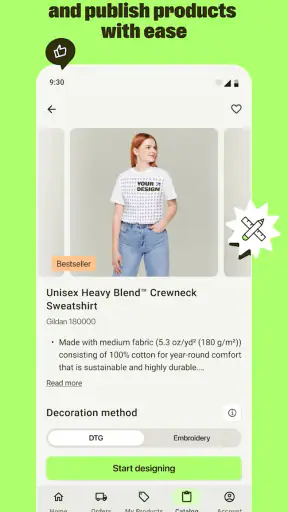
Printify is a print-on-demand platform that lets you create and sell custom products without purchasing inventory in advance. You can choose items such as shirts, hoodies, mugs, phone cases, and home décor, upload your designs, and publish them to a connected online store. When a customer places an order, a Printify production partner prints and ships it, while you manage the storefront and customer relationship.
Is Printify free to use, or are there subscription costs?
Printify offers a free plan that allows users to create products, design mockups, and connect supported sales channels. You generally pay the product and shipping costs when an order is fulfilled, rather than paying for stock upfront. A paid Premium plan may be available with product discounts and additional benefits, so it is worth comparing the current pricing, transaction costs, and expected order volume before subscribing.
What products and sales channels does Printify support?
Printify provides a broad catalog that can include apparel, accessories, stationery, drinkware, wall art, and other customizable merchandise. Available products can vary by country and production provider. The service can also connect with selected ecommerce platforms and marketplaces, allowing products to be published and orders to be synchronized. Before committing to a design, check the current catalog, integration options, and regional availability.
How long do Printify orders take to produce and deliver?
Delivery time depends on the product, production partner, destination, shipping method, and seasonal demand. Orders usually require a production period before they are handed to the carrier, so the total delivery estimate is longer than the shipping time alone. In my experience evaluating the workflow, it is important to review provider-specific production estimates and order samples before advertising strict delivery dates to customers.
Can I order samples and what should I know about quality control?
Yes, ordering samples is strongly recommended before selling a product widely. A sample lets you inspect print sharpness, colors, material, sizing, packaging, and the accuracy of the product mockup. Quality can differ between providers and product types, so do not assume every item will look identical. Reviewing samples also helps you create more accurate listings and handle customer expectations more confidently.
Pros
- Easy access to a wide range of print-on-demand products.
- No inventory or upfront bulk purchasing is required.
- Product mockups help preview designs before publishing.
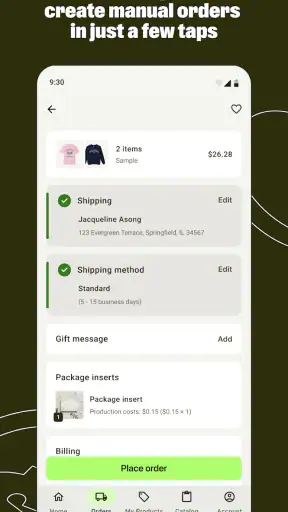
- Supports order fulfillment and shipping through connected providers.
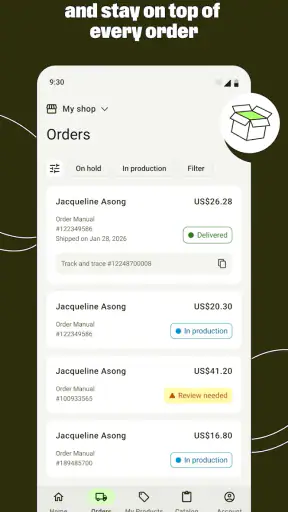
- Useful analytics and order tracking for growing stores.
Cons
- Profit margins can vary significantly between products and suppliers.
- Shipping times may be longer for international customers.
- Some products have limited customization options.
- Quality and packaging can differ between fulfillment providers.
- Advanced store integrations may require extra setup and testing.